AI for sales teams
The agent replies to leads on WhatsApp and Telegram right away, even at night, asks for the details and opens a deal in amoCRM or Bitrix24. Your manager starts the conversation already knowing what the customer needs, and decides on discounts and off-list prices

WhatsApp · customer
21:52Good evening! I want to replace 3 windows in my flat. How much would that cost? And can someone come to measure on Saturday morning?
Sales agent
Reads and acts
Reading the lead
- 3 windows, flat
- measuring: Saturday am
- price question
Bitrix24 · Customer record
Customer record
Calendar · Surveyors on Saturday
Surveyors on Saturday
Sales rules
Reply to the customer
21:52Good evening! Measuring is free, and Saturday at 11:00 is open, so I’ve booked you in. We’ll give you the exact price once we’ve measured. Our manager Anna will message you tomorrow by 10 am to confirm the address.

Bitrix24 · Lead for a manager
- Deal:
- 3 windows, visit Sat 11:00
- Task:
- confirm address by 10 am
Works with your CRM and messengers
-
Leads don’t wait till morning
Replies on WhatsApp and opens a deal
-
Prices by your rules
Anything off the list goes to a manager
-
Tested before launch
On your real chats with customers
What AI can take on in sales
Start where the team loses customers every day: leads wait for a reply, promises slip, deals sit without a next step. Sales is often where a company’s AI implementation begins
How the agent reasoned
Already working
Tickets to the Kaizen Club summit were sold by a Telegram bot, from the quiz to the payment. The Almaty Marathon agent answers what people ask before they pay: places left on a distance, payment, transferring a slot
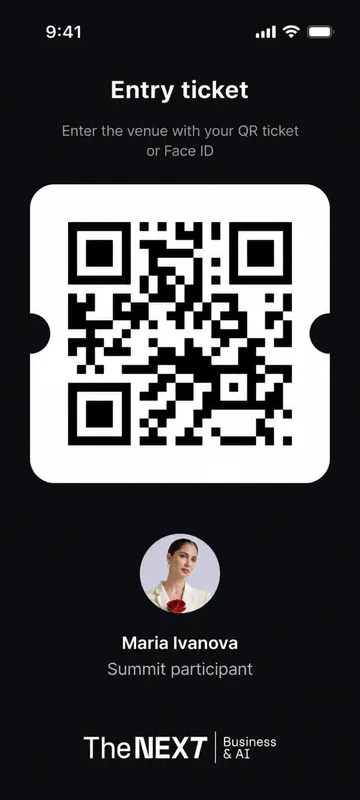 Mini app screen: the attendee’s personal QR ticketSales bot · Telegram · Kaizen Club
Kaizen Club: summit tickets sold by a Telegram bot
The bot walks the buyer from a sales-style AI quiz to checkout. The CRM is synced with the club database, so the bot recognises the buyer’s tier (resident, platform member or external client) and quotes the right price.
- 226 attendees went through the whole journey in one product, from the ticket to the materials after the summit
- 3 payment providers in the bot: Stripe, TipTopPay and PayForm
- 7 weeks to build the whole system, and the summit date never moved
Scenario transcript
Question
- Customer: Hello! I’d like to sign up for the marathon
- Under the hood: Race calendar. Knowledge base, races 2026, Almaty Marathon 2026: registration, Astana Half Marathon 2026: registration, Tau Jarys 2026: registration. Three races on the calendar
- Agent: Good afternoon! I’m the Almaty Marathon assistant. Which race would you like to know about? The calendar now has Almaty Marathon 2026, Astana Half Marathon 2026 and Tau Jarys 2026.
Race kit
- Customer: Almaty Marathon. Where do I pick up my race kit?
- Under the hood: Race kit pickup. Knowledge base, Almaty Marathon · race kit, Where: pickup point, How: QR code from the email. Pickup point, QR code
- Agent: Race kits are handed out at the pickup point before the race. Show the QR code from your registration email.
Refund to a manager
- Customer: And if I can’t run, will I get my money back?
- Under the hood: Agent permissions. Refunds: manager. A person decides on refunds
- Under the hood: Handoff to a manager. WhatsApp, To: manager, Summary: race, kit, refund. The manager has the summary
- System: Refund → manager · chat summary attached
- Agent: I’ve passed your question to a manager. They’ll reply right here.
First-line agent · WhatsApp, Instagram · Almaty MarathonAlmaty Marathon
The agent answers participants on rules, schedule, registration and race packs. Refunds, complaints and VIP requests go to a manager with a summary of the chat.
- 9 in 10 conversations resolved without an operator
- ~2,130 conversations with race participants
- WhatsApp and Instagram around the clock
Works in the CRM your managers already use
Managers stay in amoCRM or Bitrix24, and the agent writes there too. Before we build, we agree which fields it fills in itself and which it only suggests to a manager
- WhatsApp
 Telegram
- Website chat
Sales agent
Reads the lead, checks the price list and the CRM, and acts by your sales rules
 OpenAI
 Anthropic
 amoCRM, Bitrix24 deals, tasks, customer history reads writes
 1C, ERP stock, prices, invoices reads
  Google Sheets price list and discount rules reads
  Notion, Drive proposal templates and decks reads
  Site forms, your API leads and ad sources reads
Where the agent decides and where your manager does
We write down your sales rules before launch and agree price, discounts and deadlines separately
Handles itself
What repeats every day
- Answers on prices, stock and delivery times
- Asks one or two follow-up questions
- Opens a deal and fills in the CRM record
- Books a call, a measuring visit or a viewing
Drafts, the manager sends
The draft is ready, a person decides
- Proposals and invoices
- A message to a customer who went quiet after a proposal
- Moving a deal to the next stage
Goes straight to a manager
With the chat and the details collected
- Discounts, instalments and special terms
- Deadlines outside the standard
- Complaints, returns and claims
- Large or unusual deals
Everything the agent writes shows up in the deal record, so the manager knows what the customer was told and why
How we test the agent before its first customer
Before the agent replies to a live buyer, we run it on your past leads and difficult chats
- A set built from your leads
- 100–200 real chats with customers and the replies your best managers consider right. The set always includes haggling, “too expensive”, discount requests and one-word messages.
- A different model grades
- A separate judge model, not the one that answered, scores the answers. We check its scores against your staff’s own grades.
- Every miss gets reviewed
- An overall score can hide individual errors, so every answer below the threshold is reviewed on its own and fixed before launch.
- Acceptance on new questions
- We sign off on questions the system never saw during tuning, so the result can’t be fitted to familiar ones.
- WA How much if we take 50? priced it from the bulk tiers 0.91
- TG Send a proposal for our company collected the details, passed the proposal to a manager 0.87
- WEB Your competitors are cheaper answered on value, no discount 0.83
- WA Can you ship tomorrow if I pay today? judge: promised a date without checking stock 0.62
- TG Do you offer instalments? 0.90
- WA Call me back after 6 pm set the manager a task for 6 pm 0.95
- WEB Give me 15% off my first order passed the question to a manager 0.93
- WA Can we pay by bank transfer with VAT? judge: quoted an outdated price list 0.74
- TG hw much is delivery 0.85
- WEB Can I see samples in your showroom? booked a visit 0.88
Illustration of the mechanics with sample data. The real set is built from your requests during the audit.
How we launch AI in a sales team
Five stages. After each one you decide whether to go on. Each stage is paid separately
Pick one process
2–3 working daysWe find where the team loses hours and pick one process with an owner on your side and a result that can be counted.
A short memo: the process, the type of solution, what success means, and what stays out of the first stage.
Process, metric and owner are agreed.
Timelines start once access is granted: without chat exports and a test API the audit cannot start. WhatsApp number verification with Meta takes from a few days to three weeks, so we start it on day one. Projects with several processes or heavy integrations with 1C and custom systems take 3–4 months, but even there a working version ships in the first month.
Questions about AI in sales
Yes. We build on top of the tools you already run: WhatsApp, Telegram, amoCRM, Bitrix24, 1C, Google Sheets, Notion, and internal APIs. We check the access model and limits of each integration before development. Early on we define what AI may write directly and what it should only suggest to a person.
For incoming leads, yes: it answers on prices and stock, asks for details and books meetings. It writes to a customer first, say with a reminder after a pause, only with a manager’s permission. At the start we often switch on draft mode: the agent prepares the message, the manager edits and sends it. Once edits become rare, some messages move to automatic sending.
No. The agent takes the work that eats time but needs no experience: the first reply, collecting details, filling in the CRM, reminders. Price talks, negotiation, big deals and customer relationships stay with the managers. The goal is for the same team to stop losing leads and spend its time on conversations that lead to a sale.
Every morning it sends a report: leads with no reply, deals with no next step, promises to customers nobody has kept, objections that keep coming back. Managers see the criteria and can challenge a score they disagree with. The report is there to help with specific deals in time, not to watch people.
Yes. We choose a reliable integration path and discuss message templates, limits, consent, conversation storage, and when the dialog should move to a person. Employees’ private chats stay separate from the work system.
An agent for one part of the funnel, such as incoming WhatsApp leads, starts at $2,000. The first working version is ready 2–4 weeks after we get access. Extra channels and integrations raise the price: 1C, telephony, more than one CRM. Support after launch runs $200 to $1,000 a month. We name the exact figure once we have seen your leads and your CRM.
A process owner who makes decisions, 30–100 real requests, conversations, or documents, a list of systems with access to their test APIs, handoff rules, and examples of good team answers. The knowledge base does not have to be perfect: we build the test set together.
The code, the knowledge base, the test set with reference answers, and documentation. Model keys and accounts are in your company’s name, so the system can keep evolving with us or without us.
Articles on AI in sales
- AI for sales teams Where AI helps sales and what it must never promise a customer
- How AI helps control a sales team The morning report a head of sales needs, without turning it into surveillance
- AI sales analytics Connecting Claude Code or Codex to your CRM and warehouse without made-up numbers
- AI integration in CRM Which fields AI updates itself and where a manager has to confirm
- How AI answers customers in WhatsApp What to answer automatically and when to hand the chat to a manager
Let’s talk
Tell us where your leads come from, which CRM the team uses and where customers slip away today. We will suggest which part of the funnel to start with and estimate the first stage.

I read every request myself.