In short
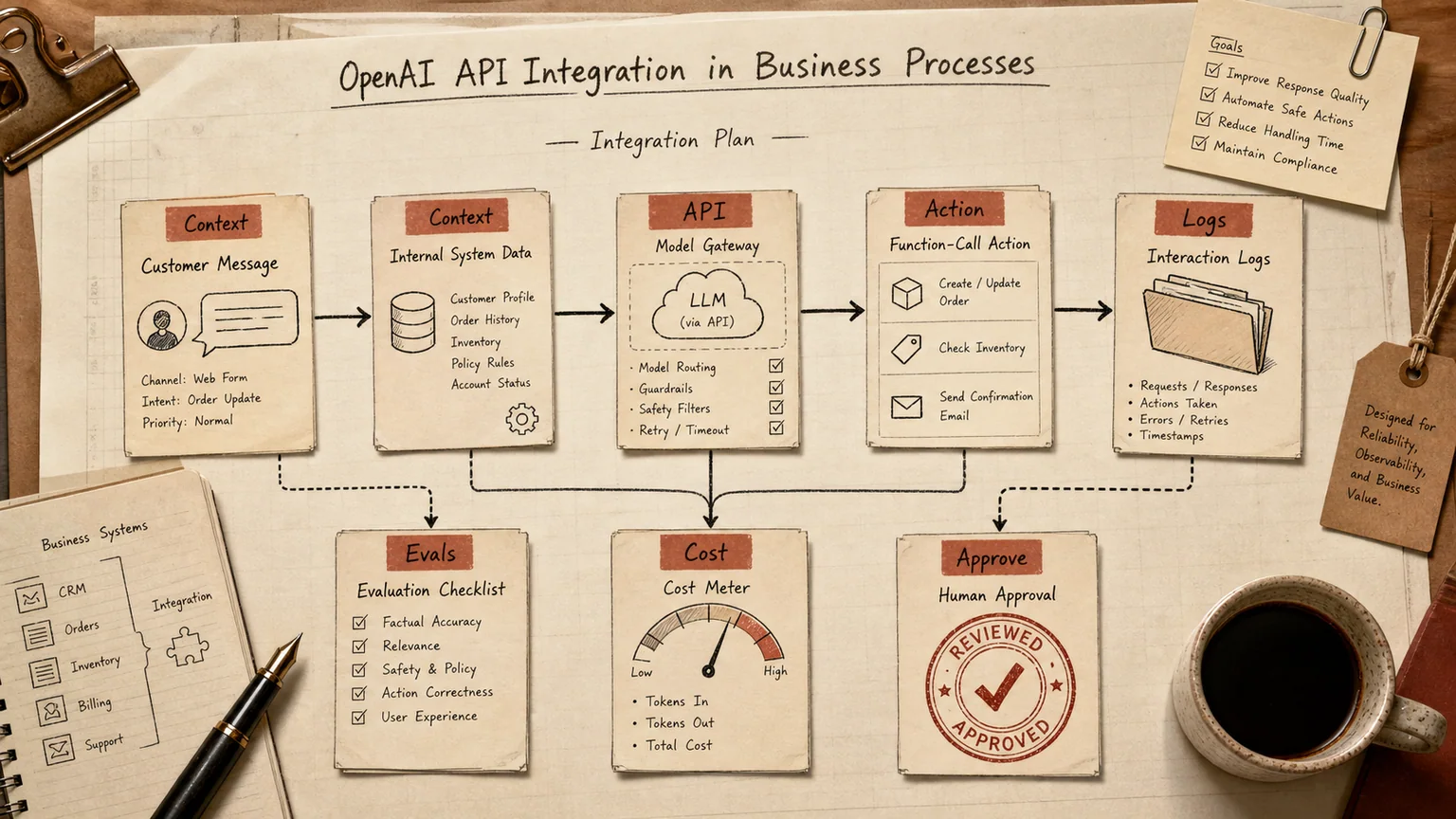
OpenAI API integration means wiring GPT models into your own systems by code, not by opening a chat window. A request leaves your CRM, support desk, or document pipeline, a model processes it, and your application decides what to do with the answer. Three questions come up in nearly every business conversation about this: what it actually costs at real usage volume, which workflows pay for themselves, and what happens to customer data once it leaves your perimeter.
This guide answers those three, then covers the one question most vendors skip: when OpenAI is not the right call and Claude or a self-hosted model fits better.
What the API does, and what it doesn't
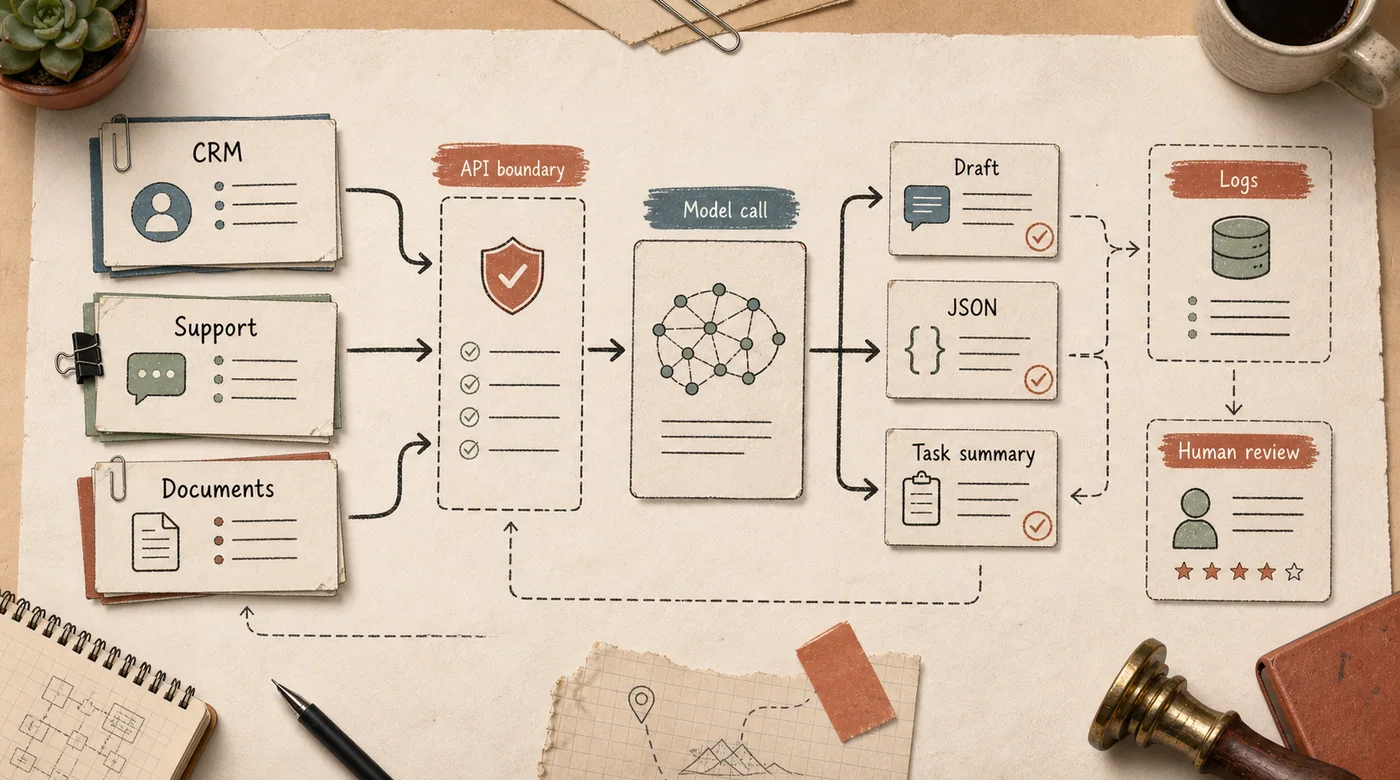
The API does not know your business. It takes text in, returns text out — sometimes strict JSON, sometimes a function call, where the model doesn't answer the customer directly but tells your system "check inventory for this SKU" or "flag this invoice for review." Your code decides whether to act on that.
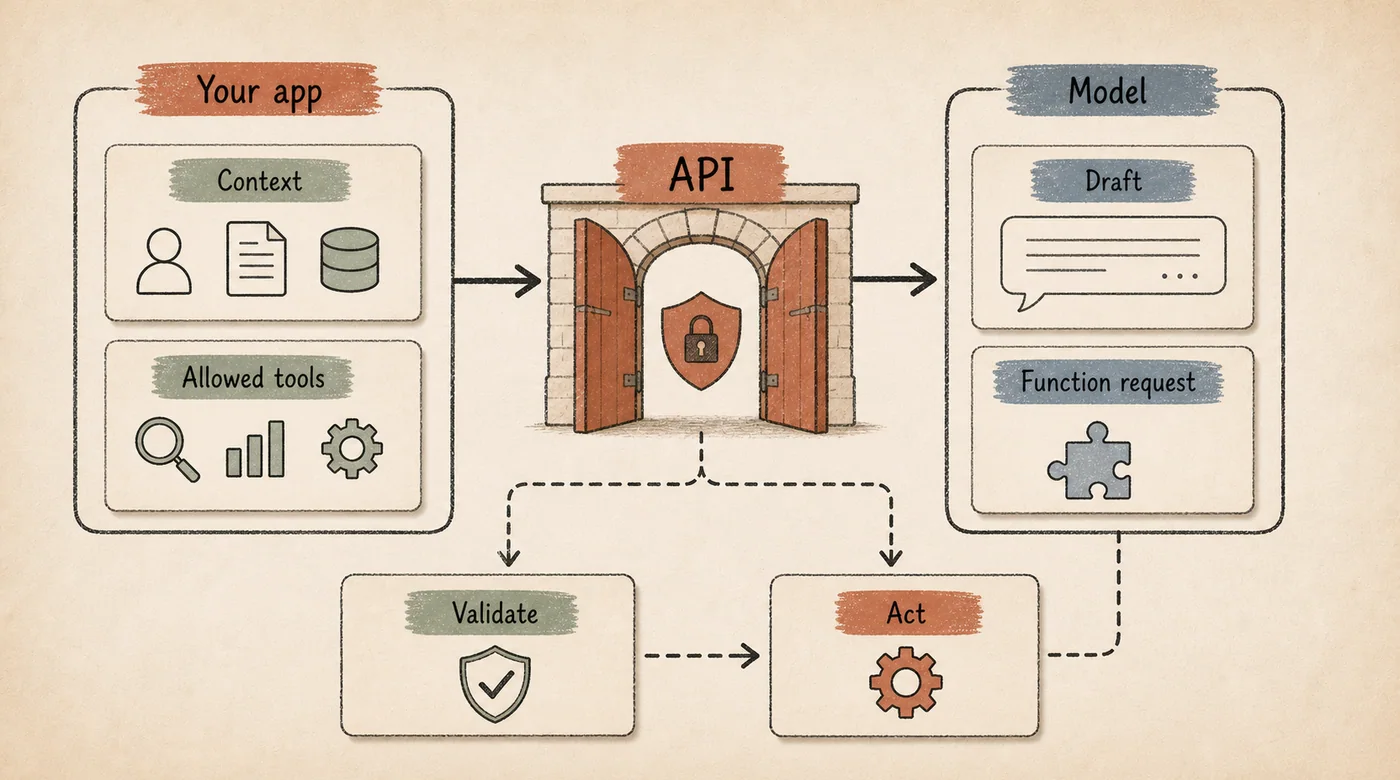
That's the real difference from a ChatGPT subscription. A subscription is an interface for one person in a browser. The API sits between a customer and your systems: it reads a support ticket, checks a CRM field, drafts a reply, logs the exchange. Teams that skip that middle layer end up with a model that writes convincingly but doesn't know the actual state of an order, a case, or an account.
Three capabilities show up in most production integrations. Text generation and rewriting — drafting replies, summarizing tickets, rewriting product copy. Structured extraction — pulling amounts, dates, and vendor names off a scanned invoice straight into JSON a database can use. And function calling, where the model triggers an action in your system under rules you wrote, rather than improvising one.
What OpenAI API pricing looks like right now
Billing runs on tokens, roughly 4 characters of English text, charged separately for input (what you send) and output (what the model generates). According to the official OpenAI API pricing page, standard short-context rates in July 2026 are:
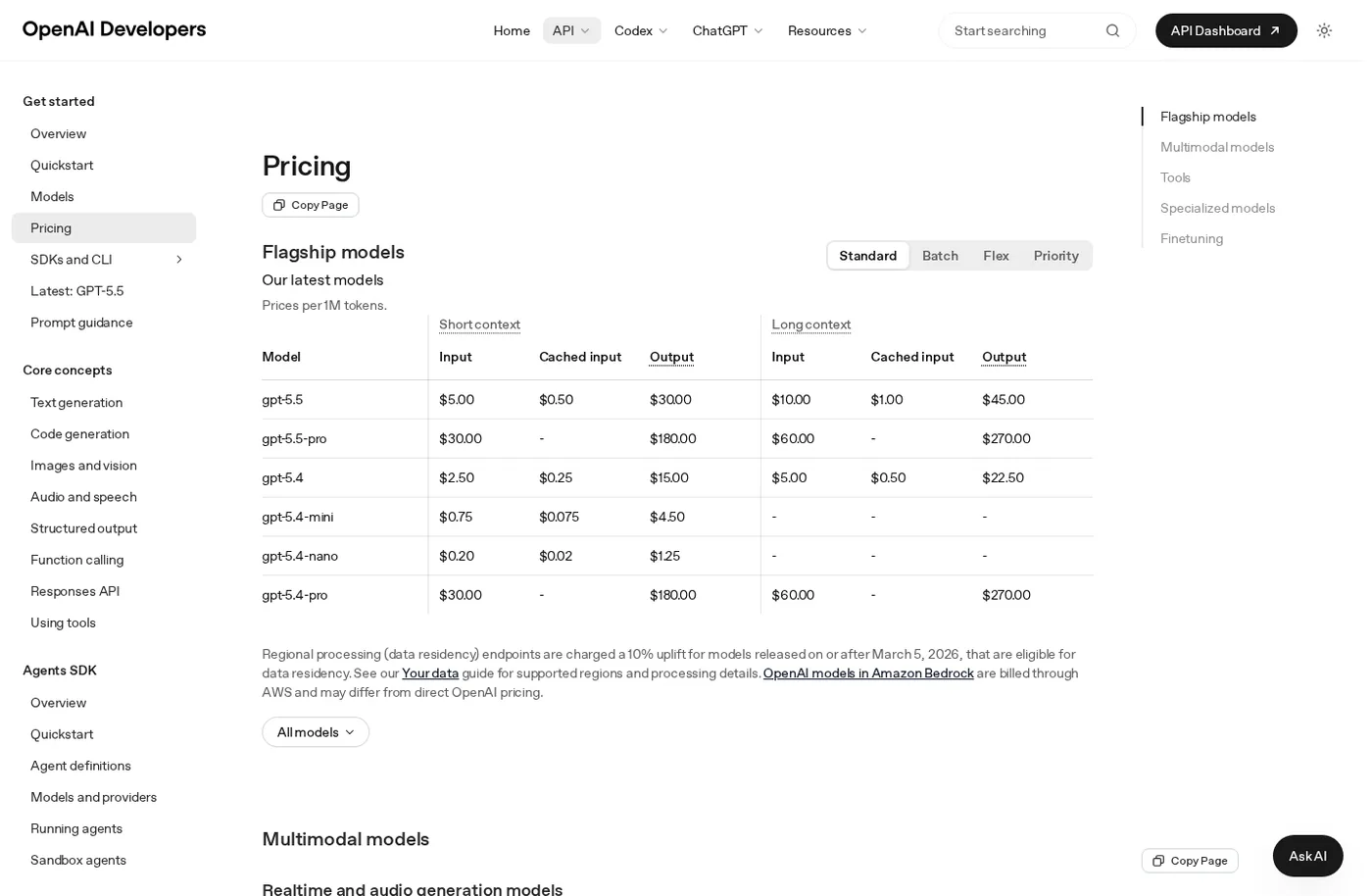
Source: the official OpenAI API Pricing page, public page captured in July 2026.
- GPT-5.5, the flagship for complex reasoning, runs around $5 per million input tokens and $30 per million output tokens.
- GPT-5.4, the workhorse for most production tasks, runs about $2.5 input and $15 output per million tokens.
- GPT-5.4-mini runs $0.75 input and $4.50 output per million tokens.
- GPT-5.4-nano runs $0.20 input and $1.25 output per million tokens, built for classification and short-form tasks.
Two levers cut the bill meaningfully. Prompt caching — for a system instruction, a knowledge base, or conversation history that repeats — makes cached input roughly 10x cheaper. Batch API and Flex processing, for anything that doesn't need a real-time answer (nightly ticket categorization, bulk document processing), run at roughly half the standard input and output price. For most background jobs, skipping them is leaving money on the table.
Enterprise procurement adds its own wrinkle: a ChatGPT Business or Enterprise seat license and API usage are billed separately, on separate accounts. A company paying for Enterprise seats for staff still needs a distinct API key and a distinct budget line for anything built into a product.
Three integrations that actually pay off
Customer support
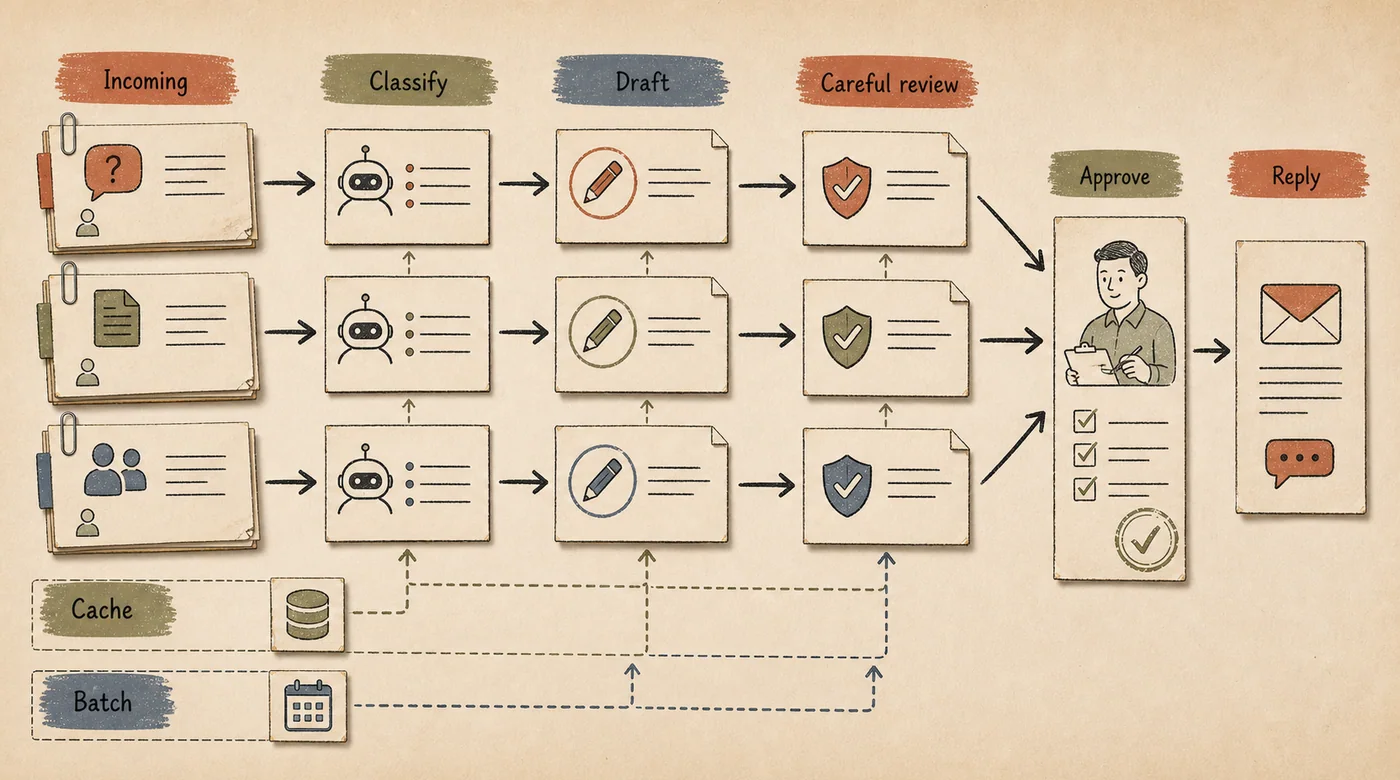
Ticket classification, complaint summarization, and reply drafts for a human agent are a good fit for a cheap model, and the payoff compounds with volume. A support desk handling hundreds of tickets a day sees a real cost difference between routing everything through the flagship model and reserving it only for genuinely hard cases — often thousands of dollars a month at similar output quality.
The working pattern looks like this: a message arrives, an orchestration layer decides whether it needs CRM or knowledge-base context, builds the model request, checks the draft, and injects real data — order status, delivery date, refund eligibility — before anything reaches the customer. Skip that layer and the model answers fluently but wrong: it promises stock that isn't there or quotes a shipping date nobody confirmed.
Document processing
Extracting fields from invoices, contracts, and claims into structured JSON is a well-bounded task with a checkable output — the amount either matches the source document or it doesn't. This isn't a job for stuffing an entire document archive into one prompt; that hits context limits and cost before it hits quality problems. It calls for a retrieval layer over approved source documents — see how RAG works beyond vector embeddings for what that layer actually needs to do.
CRM and internal systems
Here the API reads and writes, not just replies: summarizing a thread, suggesting a next step for a rep, updating a deal stage. Our AI CRM project is a working example of that pattern — the model operates on real account data, not a generic chat window. Teams running Salesforce or HubSpot alongside a support desk usually get more mileage from having the API read those systems directly than from trying to encode business logic inside the prompt itself; see AI CRM integration for the tradeoffs.
When the workflow needs to hold context across a longer conversation, touch multiple systems, and know when to stop and hand off to a person, that's no longer a single API call — it's an AI agent built for the workflow, not a wrapper around one endpoint.
What happens to customer data
This is the question most teams raise too late. By default, OpenAI may retain API inputs and outputs for up to 30 days for abuse monitoring, then deletes them. For sensitive data — health records, financial details, anything under a stricter compliance regime — Zero Data Retention (ZDR) processes the request in memory and discards it once the response completes. ZDR is not a self-serve toggle; it requires enrollment and account-team approval for eligible endpoints.
By default, API and enterprise ChatGPT data is not used to train or improve models. OpenAI also offers regional processing for supported models and regions; for eligible models released on or after March 5, 2026, data-residency endpoints can carry a price uplift.
In practice, that turns into a short checklist before any integration: what actually goes into the prompt (a full customer email, or only the fields you need), whether a Data Processing Addendum is in place, who's accountable if an API key leaks into a public repo or an unsecured log, and whether personally identifiable fields get masked before the request leaves your system rather than trusting the model to handle them responsibly.
OpenAI vs. Claude vs. a local model
Three scenarios cover most of these decisions.
OpenAI API is a reasonable default for a first build: broad documentation, wide tooling support, fast time to production without standing up infrastructure. It fits when volume is moderate and data doesn't require on-premise isolation.
Claude tends to win on long-document work and precise instruction-following — contract review, multi-step agentic workflows where a mistake is expensive. In practice, many teams run both and route by task rather than by vendor loyalty.
A self-hosted or open-weight model earns its keep once volume is genuinely high — millions of tokens a day, not hundreds of conversations — or when a regulator or client contractually requires data to stay inside your perimeter, which shows up most often in finance and healthcare. The break-even point for running your own inference usually lands months into steady load, not in the first month, and it comes with a standing GPU and ops cost that's easy to underestimate at the proposal stage.
The practical strategy for most companies isn't picking a side. It's starting with the API, running a pilot long enough to see a real token bill, and using those numbers to decide whether self-hosting is worth the operational overhead.
Common integration mistakes
Teams mix up subscription billing and API billing — they're separate accounts, and paying for one buys zero tokens on the other. API keys end up committed to a public repository and get scraped within hours. A pilot launches on the flagship model because it's the most capable, and the bill lands several times higher than expected once the mini-tier model would have done the job. Multilingual and mixed-language input never gets tested before launch, and that's exactly what breaks a demo that looked flawless in English. Nobody logs what the model answered or what data it used to answer, so three months later no one can explain why a customer got the wrong quote.
How to run a pilot
Don't wire the API into every channel at once. Pick one narrow process with a clear volume — ticket categorization in a single support channel is a common starting point. Measure how long it takes a person to do it manually today. Connect a low-cost model and compare quality against the manual baseline for two to three weeks. Then look at the actual token bill against the time saved. How to choose an AI implementation vendor covers the same evaluation logic if you're deciding whether to build this in-house or bring in help.
If nobody on the team is ready to deal with rate limits, key rotation, caching, and logging, a DIY build tends to turn into months of infrastructure work instead of a shipped result. In that case, it's usually faster to bring in a team that has already run this kind of GPT integration — from model selection under a real budget to secure key storage and audit logging.
FAQ
How is the OpenAI API different from ChatGPT Enterprise?
ChatGPT Business or Enterprise is a seat-based interface for employees, with SSO and admin controls. The API is a separate, code-level integration point for embedding a model in your own product, CRM, or support tool. Billing is separate, and paying for one doesn't unlock the other.
Is the OpenAI API more expensive than running a local model?
At moderate volume — hundreds of conversations a day — the API is almost always cheaper, since there's no server or GPU to maintain. Self-hosted infrastructure starts to pay for itself only at sustained volume in the millions of tokens per day, and even then not immediately.
Can we use the OpenAI API without an in-house developer?
Technically, integration requires code, but a growing number of no-code platforms and bot builders now wrap API calls behind a visual interface. The gap shows up in flexibility, usually once the workflow outgrows what the builder was designed for.
What should we do with customer PII before sending it to the API?
Mask sensitive fields — ID numbers, card details, health information — before the request is built, use Zero Data Retention where it's available for your use case, and confirm with any vendor or contractor exactly who can see request logs and where the data physically lives.
If your team already has a backlog of manual text work — tickets, documents, CRM notes — the useful next step isn't reading OpenAI's docs cover to cover. It's a pilot on one process, with an honest token bill and a real measure of the time it saves.